
Robot Vacuum Maintenance Guide
A robot vacuum can save hundreds of hours of cleaning over its lifetime, but like any machine, it requires regular maintenance to perform at its best. Whether you own a budget robot vacuum, a self-emptying robot vacuum, a robot vacuum and mop combo, or a premium LiDAR robot vacuum, proper maintenance helps improve cleaning performance, extend battery life, reduce breakdowns, and maximize long-term value. This guide covers everything you need to know to keep your robot vacuum running like new.
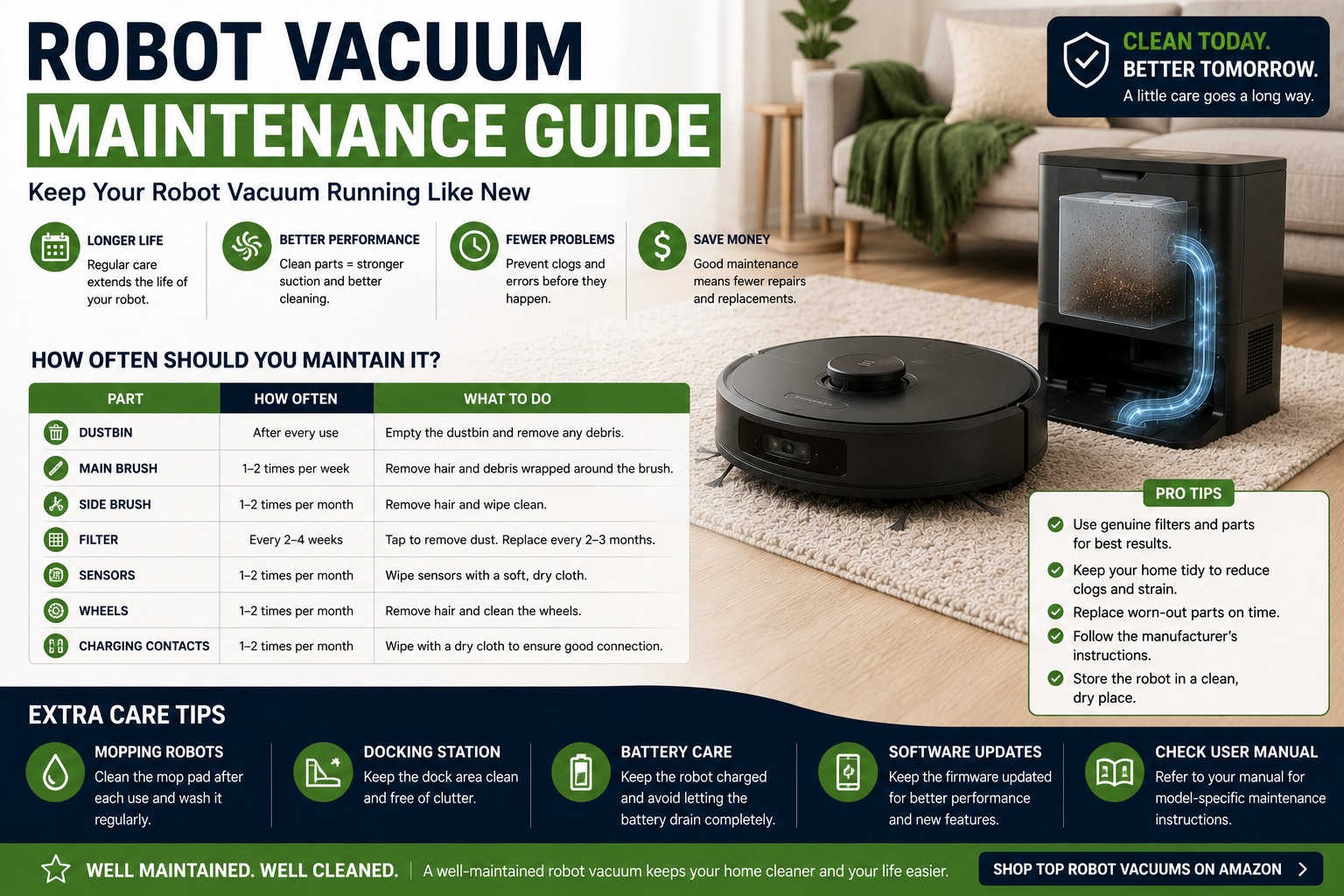
Why Robot Vacuum Maintenance Matters
Many people assume robot vacuums are completely maintenance-free. While they automate cleaning, they still require regular care to maintain peak performance.
Hair buildup, clogged filters, dirty sensors, worn brushes, and neglected wheels can reduce cleaning efficiency, shorten battery life, increase navigation problems, and even lead to costly repairs.
How Often Should You Maintain a Robot Vacuum?
| Component | Recommended Maintenance |
|---|---|
| Dustbin | After every few cleaning cycles |
| Main Brush | Weekly |
| Side Brushes | Weekly |
| Filters | Every 1-2 weeks |
| Sensors | Monthly |
| Wheels | Monthly |
| Self-Empty Dock | Monthly |
| Battery Check | Every few months |
Step 1: Empty the Dustbin Regularly
Even self-emptying robot vacuums require occasional dustbin inspections. Standard robot vacuums should have their dustbins emptied regularly to maintain airflow and suction performance.
Allowing the dustbin to become overfilled can reduce cleaning effectiveness and place additional strain on the vacuum motor.
Step 2: Clean the Main Brush
The main brush is one of the most important cleaning components on any robot vacuum. Hair, string, carpet fibers, pet fur, and debris can wrap around the brush over time.
Removing tangled hair improves suction efficiency, reduces motor strain, and allows the brush to agitate carpet and debris more effectively.
Step 3: Clean Side Brushes
Side brushes help sweep debris from corners, edges, baseboards, and hard-to-reach areas into the robot's cleaning path.
Check side brushes regularly for tangled hair, damaged bristles, and accumulated debris. Replace them when they become excessively worn.
Step 4: Maintain Filters
Filters play a critical role in trapping dust, allergens, pet dander, and fine debris. Dirty filters restrict airflow and reduce cleaning performance.
Many filters can be tapped clean between replacements, but eventually they should be replaced according to manufacturer recommendations.
Homes with pets may need more frequent filter maintenance due to increased hair and dander accumulation.
Step 5: Clean Sensors
Robot vacuums rely on sensors to navigate your home, avoid obstacles, detect cliffs, and return to their charging dock.
Dirty sensors can lead to navigation errors, missed rooms, unnecessary collisions, or charging problems.
Use a soft microfiber cloth to gently wipe sensors without scratching them.
Step 6: Inspect Wheels
Hair and debris often accumulate around the robot's drive wheels and caster wheel. This buildup can affect movement, traction, navigation accuracy, and cleaning efficiency.
Periodically remove trapped debris to keep the wheels moving freely.
Maintaining Self-Emptying Robot Vacuums
Self-emptying robot vacuums reduce daily maintenance, but they still require periodic attention.
Tasks include:
- Replacing dock bags
- Cleaning dock sensors
- Checking transfer channels for clogs
- Inspecting seals and airflow paths
- Removing debris buildup around the dock
If you're considering an upgrade, see our guide to the best self-emptying robot vacuums.
Maintaining Robot Vacuum and Mop Combos
Robot vacuum and mop combinations require additional maintenance because they manage both dry debris and water systems.
- Clean mop pads regularly
- Wash reusable mop cloths
- Empty dirty water tanks
- Refill clean water tanks
- Inspect mop mechanisms
Learn more in our guide to the best robot vacuum and mop combos.
Battery Maintenance Tips
The battery is one of the most expensive components inside a robot vacuum. Proper charging habits can help maximize battery lifespan.
- Keep the charging dock plugged in
- Avoid exposing the robot to extreme heat
- Use the robot regularly
- Keep charging contacts clean
- Update firmware when available
Most modern lithium-ion batteries last several years before significant capacity loss occurs.
Signs Your Robot Vacuum Needs Maintenance
- Reduced suction power
- Shorter battery life
- Missed cleaning areas
- Navigation problems
- Frequent error messages
- Increased cleaning noise
- Poor pet hair pickup
Common Maintenance Mistakes
- Ignoring hair buildup
- Never replacing filters
- Forgetting sensor cleaning
- Ignoring wheel maintenance
- Overfilling dustbins
- Neglecting self-empty docks
- Using damaged brushes too long
Robot Vacuum Maintenance by Home Type
Pet Owners
Pet owners typically need more frequent brush, filter, and dustbin maintenance because of increased hair accumulation.
Compare our guide to the best robot vacuums for pet hair.
Carpeted Homes
Carpet generates more dust and fiber buildup, making brush cleaning particularly important.
See our guide to the best robot vacuums for carpet.
Hardwood Floor Homes
Hardwood floors generally create less brush buildup but may require more frequent sensor cleaning due to fine dust.
Read our guide to the best robot vacuums for hardwood floors.
How Long Do Robot Vacuums Last?
With proper maintenance, many robot vacuums last between five and ten years. Premium models with replaceable batteries, filters, brushes, and wheels often remain useful even longer.
Regular maintenance is the single best way to maximize the lifespan of your robot vacuum investment.
SHOP ROBOT VACUUM ACCESSORIESRelated HomeBotGuide Articles
- Robot Vacuum Buying Guide for Beginners
- Robot Vacuum vs Regular Vacuum
- Best Self-Emptying Robot Vacuums
- Are Self-Emptying Robot Vacuums Worth It?
- Best Budget Robot Vacuums
- Best Robot Vacuums for Apartments
- Best Robot Vacuums for Large Homes
- Best Robot Vacuums for Multiple Floors
- Best Robot Vacuums for Pet Hair
- Best Robot Vacuums for Carpet
- Best Robot Vacuums for Hardwood Floors
FAQ – Robot Vacuum Maintenance
How often should I clean my robot vacuum?
Basic maintenance such as dustbin emptying and brush inspection should occur weekly, while filters, sensors, and wheels should be checked regularly.
Do self-emptying robot vacuums need maintenance?
Yes. Self-emptying systems reduce maintenance but still require bag replacement, dock cleaning, and periodic inspections.
How often should robot vacuum filters be replaced?
Most filters last several months, depending on usage, pets, and household dust levels.
Why is my robot vacuum losing suction?
Dirty filters, clogged brushes, full dustbins, or airflow restrictions are common causes of reduced suction.
How long do robot vacuum batteries last?
Most lithium-ion batteries last several years with proper care and normal usage.
Can maintenance improve cleaning performance?
Absolutely. Proper maintenance helps maximize suction, navigation accuracy, battery life, and overall cleaning effectiveness.
We may earn a commission from qualifying purchases at no extra cost to you.