
Robot Vacuum Buying Guide for Beginners
New to robot vacuums? Learn how to choose the right model by understanding suction, mapping, battery life, smart features, and maintenance. This guide explains the major options, practical tradeoffs, maintenance needs, and buying considerations.
As an Amazon Associate, HomeBotGuide may earn from qualifying purchases at no extra cost to you.
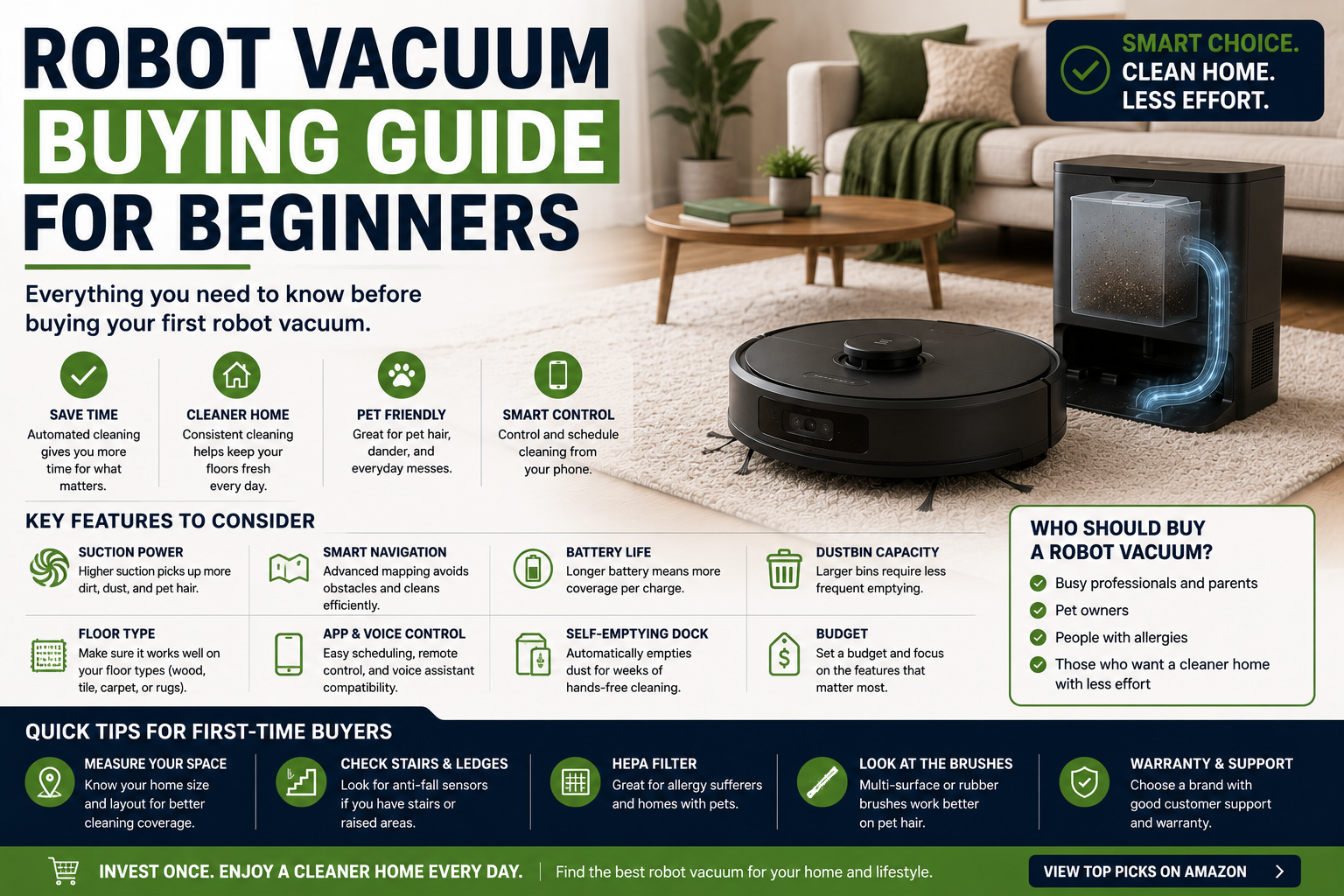
Beginners should choose a robot vacuum based on floor type, home size, pet hair, clutter, dock space, and maintenance tolerance. Reliable mapping and easy brush access usually matter more than maximum suction claims or novelty AI features.
Robot Vacuum Buying Guide for Beginners at a Glance
Improves coverage, room control, and no-go zones.
Reduces brush maintenance and hair buildup.
Cuts down routine bin handling.
Adds light damp cleaning after dry pickup.
Robot Vacuum Buying Guide for Beginners Comparison Table
| Type | Best For | Core Features | Important Limitation |
|---|---|---|---|
| Random Navigation | Small simple spaces | Lowest cost | Less efficient coverage |
| Lidar Mapping | Most homes | Accurate rooms and low-light operation | Top sensor adds height |
| Camera Navigation | Cluttered homes | Object recognition | Privacy and lighting concerns |
| Self-Emptying Dock | Pet and large homes | Automatic debris disposal | Cost and footprint |
| Vacuum-and-Mop Combo | Hard floors | Two cleaning functions | Wet maintenance |
| Premium AI Robot | Busy mixed homes | Advanced avoidance and automation | High price |
What to Consider First
Begin with the actual home layout, floor types, cleaning frequency, debris load, and maintenance tolerance. The strongest choice is the system that can complete the real routine reliably.
- Match the cleaning method to the actual surfaces.
- Check navigation, battery, and dock requirements.
- Review ongoing maintenance and consumable cost.
- Confirm replacement parts and support.
Main Options to Consider
Lowest cost
Accurate rooms and low-light operation
Object recognition
Automatic debris disposal
Step 1: Identify Floor Types
Carpet needs agitation and traction, while hard floors need gentle rollers and good fine-dust pickup.
- Follow the manufacturer guidance for the specific model.
- Check compatibility with the real floor plan and surfaces.
- Review maintenance and replacement-part requirements.
- Keep a manual cleaning backup available.
Step 2: Measure the Home
Home size affects battery, bin capacity, mapping, and whether recharge-resume is necessary.
- Follow the manufacturer guidance for the specific model.
- Check compatibility with the real floor plan and surfaces.
- Review maintenance and replacement-part requirements.
- Keep a manual cleaning backup available.
Step 3: Consider Pets and Hair
Anti-tangle rollers, large bins, and self-emptying docks become more valuable in shedding homes.
- Follow the manufacturer guidance for the specific model.
- Check compatibility with the real floor plan and surfaces.
- Review maintenance and replacement-part requirements.
- Keep a manual cleaning backup available.
Step 4: Evaluate Navigation
Mapping allows room cleaning and no-go zones. Random navigation is cheaper but less efficient.
- Follow the manufacturer guidance for the specific model.
- Check compatibility with the real floor plan and surfaces.
- Review maintenance and replacement-part requirements.
- Keep a manual cleaning backup available.
Step 5: Decide on Mopping
Passive pads wipe lightly, while active systems scrub more effectively and require more maintenance.
- Follow the manufacturer guidance for the specific model.
- Check compatibility with the real floor plan and surfaces.
- Review maintenance and replacement-part requirements.
- Keep a manual cleaning backup available.
Step 6: Review Dock Options
Basic docks only charge. Advanced docks empty debris, wash pads, refill water, and dry mops.
- Follow the manufacturer guidance for the specific model.
- Check compatibility with the real floor plan and surfaces.
- Review maintenance and replacement-part requirements.
- Keep a manual cleaning backup available.
Step 7: Check Maintenance
Look for removable rollers, washable bins, accessible filters, and available replacement parts.
- Follow the manufacturer guidance for the specific model.
- Check compatibility with the real floor plan and surfaces.
- Review maintenance and replacement-part requirements.
- Keep a manual cleaning backup available.
Step 8: Compare Support
Warranty, software updates, battery replacement, and app reliability affect long-term value.
- Follow the manufacturer guidance for the specific model.
- Check compatibility with the real floor plan and surfaces.
- Review maintenance and replacement-part requirements.
- Keep a manual cleaning backup available.
Automation Still Requires Maintenance
Robot vacuums reduce repetitive floor cleaning but still require preparation, brush care, filter replacement, dock maintenance, and periodic manual deep cleaning.
How We Evaluated the Options
We prioritized real-world cleaning, navigation, battery, serviceability, bin and dock design, obstacle handling, replacement parts, warranty, software support, and total ownership value.
Final Verdict
Beginners should choose a robot vacuum based on floor type, home size, pet hair, clutter, dock space, and maintenance tolerance. Reliable mapping and easy brush access usually matter more than maximum suction claims or novelty AI features.
Robot Vacuum Buying Guide for Beginners FAQ
What should a beginner look for first?
Start with floor type, home size, pets, and navigation.
Is mapping necessary?
It is not essential, but it improves efficiency and control.
How much suction do I need?
Real cleaning performance matters more than one advertised number.
Do I need self-emptying?
It is most useful in pet homes and large homes.
Should I buy a mop combo?
Choose one if most floors are sealed hard surfaces.
How long should the battery last?
Long enough for the main cleaning area or with recharge-resume support.
Do robot vacuums work without Wi-Fi?
Many basic functions do, but maps and remote controls may not.
Are replacement parts important?
Yes, because brushes, filters, and batteries wear out.
What should I avoid?
Avoid buying only for suction claims or novelty features.
What is the best beginner feature?
Reliable mapping usually provides the biggest improvement.