
Best Smart Home Devices for Elderly Living Alone
Discover the best smart home devices for elderly adults living independently. Improve safety, comfort, communication, and daily convenience. This guide compares the main options, practical benefits, limitations, maintenance, safety, and long-term value.
As an Amazon Associate, HomeBotGuide may earn from qualifying purchases at no extra cost to you.
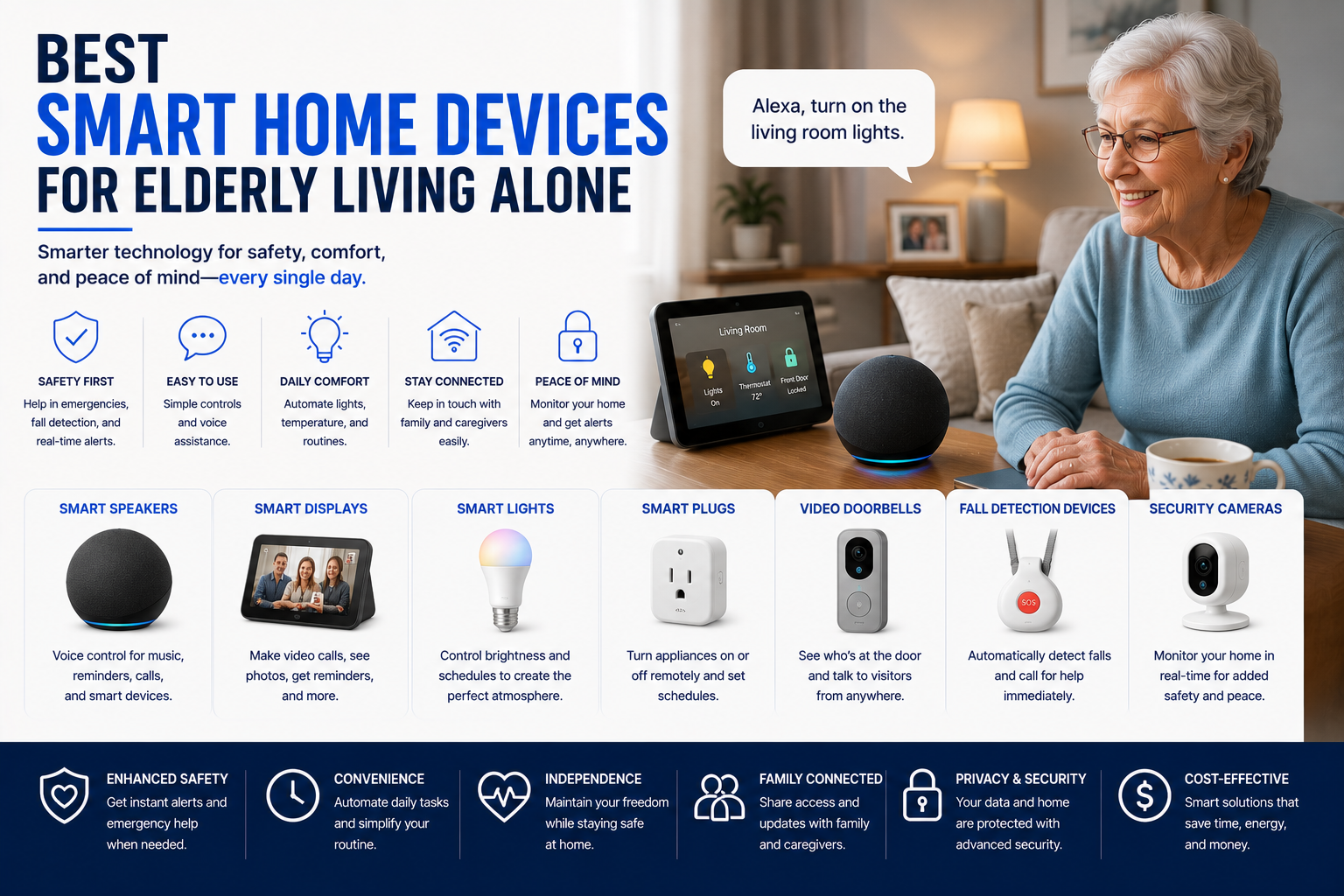
The best smart home setup for an older adult living alone combines a medical alert system, smart speakers or displays, automatic lighting, video doorbells, leak and smoke sensors, smart locks, and simple routines. Devices should be easy to use, privacy-conscious, and backed by family or professional support.
Best Smart Home Devices for Elderly Living Alone at a Glance
Provides direct emergency access and optional fall detection.
Supports voice calls, reminders, and family check-ins.
Reduces dark-room movement and manual switch use.
Adds smoke, leak, door, and motion alerts.
Best Smart Home Devices for Elderly Living Alone Comparison Table
| Type | Best For | Core Features | Important Limitation |
|---|---|---|---|
| Medical Alert System | Emergency support | Help button, monitoring, fall detection | Subscription cost |
| Smart Display | Communication | Video calls, reminders, voice control | Privacy and Wi-Fi dependence |
| Smart Lighting | Fall prevention | Schedules, motion triggers, voice control | Setup and bulb compatibility |
| Video Doorbell | Visitor awareness | Live view, alerts, two-way audio | Subscription and privacy |
| Smart Lock | Caregiver access | Codes, remote locking, activity logs | Battery and access management |
| Leak/Smoke Sensors | Home hazards | Early alerts and caregiver notifications | Requires testing and maintenance |
What to Consider First
Start with the real user, property, safety need, privacy limits, connectivity, and maintenance requirements. The strongest option is the one that fits the actual routine reliably.
- Match the product to the real task and environment.
- Check safety, power, privacy, and access requirements.
- Review maintenance and replacement-part needs.
- Keep a manual or human backup available.
Main Options to Consider
Help button, monitoring, fall detection
Video calls, reminders, voice control
Schedules, motion triggers, voice control
Live view, alerts, two-way audio
Start with Safety, Not Novelty
The strongest devices solve real risks such as falls, missed calls, dark hallways, forgotten locks, smoke, leaks, and difficult communication.
- Confirm the feature solves a real need.
- Review safety, privacy, and maintenance requirements.
- Test alerts, navigation, and backup plans.
- Keep human or manual support available.
Medical Alert Systems
A dedicated alert system remains the most important connected safety device for many seniors living alone.
- Confirm the feature solves a real need.
- Review safety, privacy, and maintenance requirements.
- Test alerts, navigation, and backup plans.
- Keep human or manual support available.
Smart Displays and Voice Assistants
Large screens and voice control can simplify calls, reminders, weather, music, and household routines.
- Confirm the feature solves a real need.
- Review safety, privacy, and maintenance requirements.
- Test alerts, navigation, and backup plans.
- Keep human or manual support available.
Lighting and Motion Sensors
Automatic pathway lighting can reduce nighttime fall risk and make rooms easier to navigate.
- Confirm the feature solves a real need.
- Review safety, privacy, and maintenance requirements.
- Test alerts, navigation, and backup plans.
- Keep human or manual support available.
Doorbells, Locks, and Entry
Video doorbells and smart locks help identify visitors and manage trusted caregiver access.
- Confirm the feature solves a real need.
- Review safety, privacy, and maintenance requirements.
- Test alerts, navigation, and backup plans.
- Keep human or manual support available.
Environmental Sensors
Connected smoke, carbon-monoxide, temperature, and leak sensors can alert both the resident and family.
- Confirm the feature solves a real need.
- Review safety, privacy, and maintenance requirements.
- Test alerts, navigation, and backup plans.
- Keep human or manual support available.
Privacy and Account Access
Limit permissions, use strong passwords, and avoid unnecessary cameras in private spaces.
- Confirm the feature solves a real need.
- Review safety, privacy, and maintenance requirements.
- Test alerts, navigation, and backup plans.
- Keep human or manual support available.
Backup Plans
Power, internet, batteries, and cloud services can fail, so phones, keys, alarms, and human contacts remain necessary.
- Confirm the feature solves a real need.
- Review safety, privacy, and maintenance requirements.
- Test alerts, navigation, and backup plans.
- Keep human or manual support available.
Automation Still Requires Oversight
Connected devices can reduce repetitive work or improve awareness, but they still require setup, supervision, maintenance, secure accounts, and backup plans.
How We Evaluated the Options
We prioritized practical usefulness, safety, reliability, communication, privacy, maintenance, replacement parts, warranty, and total ownership value.
Final Verdict
The best smart home setup for an older adult living alone combines a medical alert system, smart speakers or displays, automatic lighting, video doorbells, leak and smoke sensors, smart locks, and simple routines. Devices should be easy to use, privacy-conscious, and backed by family or professional support.
Best Smart Home Devices for Elderly Living Alone FAQ
What smart device should a senior get first?
A medical alert system or simple communication device usually provides the greatest benefit.
Are smart speakers easy for seniors?
They can be when routines and commands are kept simple.
Can smart lights reduce falls?
Motion-triggered pathway lighting can reduce dark-room movement.
Are video doorbells useful?
Yes, they help identify visitors without opening the door.
Do smart locks help caregivers?
They can provide temporary codes and remote access.
What sensors are most important?
Smoke, carbon monoxide, water leak, temperature, and door sensors.
Do these devices require Wi-Fi?
Most connected features do.
Are smart home devices private?
Privacy depends on cameras, microphones, cloud processing, and account controls.
Can family members monitor the home?
Yes, with the resident's consent and clearly limited access.
What is the biggest risk?
Overcomplicated systems that fail when the senior needs them most.