
Best Fall Detection Devices for Seniors
Compare the best fall detection devices for seniors. Learn which systems provide reliable emergency alerts, GPS tracking, and caregiver notifications. This guide compares the main options, practical benefits, limitations, maintenance, safety, and long-term value.
As an Amazon Associate, HomeBotGuide may earn from qualifying purchases at no extra cost to you.
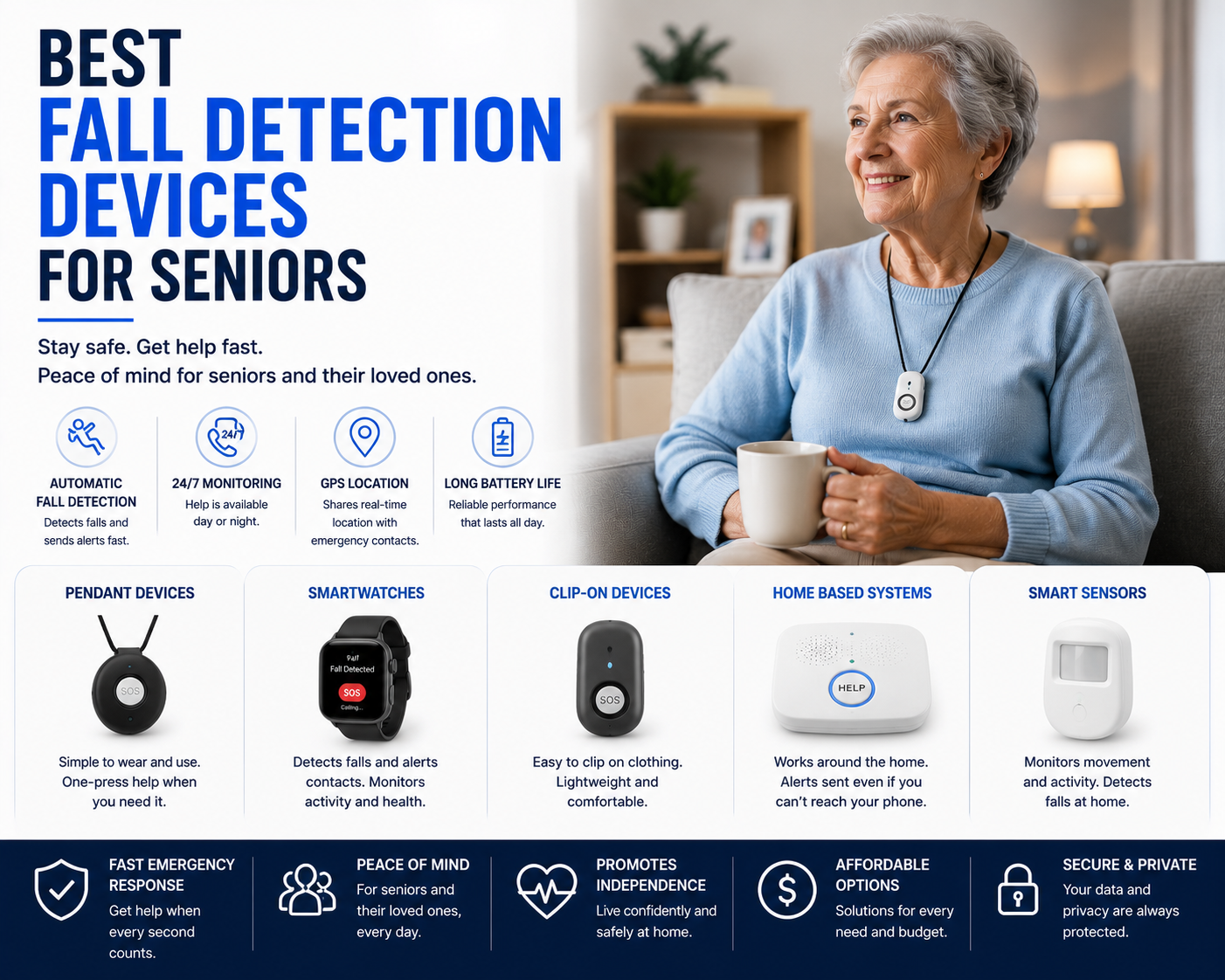
The best fall detection device for a senior is one the person will actually wear or keep nearby. Wearable medical-alert systems with automatic fall detection, two-way voice, GPS, and professional monitoring provide the strongest emergency support. Radar and room sensors add passive coverage but should supplement—not replace—a dedicated alert plan.
Best Fall Detection Devices for Seniors at a Glance
Combines automatic detection, two-way voice, and monitored response.
Adds location tracking and help away from home.
Monitors movement without requiring a wearable.
Combines direct emergency access with passive awareness.
Best Fall Detection Devices for Seniors Comparison Table
| Type | Best For | Core Features | Important Limitation |
|---|---|---|---|
| Wearable Medical Alert | Most seniors | Automatic fall detection, help button, two-way voice | Must be worn and charged |
| GPS Mobile Device | Active seniors | Location tracking and cellular emergency calls | Subscription cost |
| Smartwatch Fall Detection | Tech-comfortable users | Fall detection, calls, health features | Battery and setup complexity |
| Radar Room Sensor | Private passive monitoring | No camera and no wearable | Room-limited coverage |
| Camera-Based Detection | Family monitoring | Visual verification and alerts | Privacy concerns |
| Voice Assistant Emergency Setup | Basic home backup | Hands-free calling and routines | May not work after loss of consciousness |
What to Consider First
Start with the real user, property, safety need, privacy limits, connectivity, and maintenance requirements. The strongest option is the one that fits the actual routine reliably.
- Match the product to the real task and environment.
- Check safety, power, privacy, and access requirements.
- Review maintenance and replacement-part needs.
- Keep a manual or human backup available.
Main Options to Consider
Automatic fall detection, help button, two-way voice
Location tracking and cellular emergency calls
Fall detection, calls, health features
No camera and no wearable
Automatic Detection Is Helpful but Imperfect
No consumer fall detector identifies every fall. False alarms and missed events are possible, so the device should also include a manual help button.
- Confirm the feature solves a real need.
- Review safety, privacy, and maintenance requirements.
- Test alerts, navigation, and backup plans.
- Keep human or manual support available.
Wearability and Comfort
A device only works when worn consistently. Weight, skin sensitivity, charging, waterproofing, and ease of fastening all matter.
- Confirm the feature solves a real need.
- Review safety, privacy, and maintenance requirements.
- Test alerts, navigation, and backup plans.
- Keep human or manual support available.
Professional Monitoring vs Family Alerts
Monitoring centers can contact emergency services, while family-only systems depend on someone seeing and responding to the notification.
- Confirm the feature solves a real need.
- Review safety, privacy, and maintenance requirements.
- Test alerts, navigation, and backup plans.
- Keep human or manual support available.
GPS and Outdoor Use
Active seniors benefit from cellular GPS, location sharing, and two-way voice away from home.
- Confirm the feature solves a real need.
- Review safety, privacy, and maintenance requirements.
- Test alerts, navigation, and backup plans.
- Keep human or manual support available.
Bathroom Safety
Falls often occur in bathrooms, so water resistance and reliable signal coverage are especially important.
- Confirm the feature solves a real need.
- Review safety, privacy, and maintenance requirements.
- Test alerts, navigation, and backup plans.
- Keep human or manual support available.
Passive Room Sensors
Radar and motion systems support privacy-conscious monitoring but cannot provide direct two-way communication.
- Confirm the feature solves a real need.
- Review safety, privacy, and maintenance requirements.
- Test alerts, navigation, and backup plans.
- Keep human or manual support available.
Battery and Charging
Choose a charging routine that the senior or caregiver can maintain reliably.
- Confirm the feature solves a real need.
- Review safety, privacy, and maintenance requirements.
- Test alerts, navigation, and backup plans.
- Keep human or manual support available.
Emergency Planning
Keep medical information, contacts, access instructions, and backup communication available.
- Confirm the feature solves a real need.
- Review safety, privacy, and maintenance requirements.
- Test alerts, navigation, and backup plans.
- Keep human or manual support available.
Automation Still Requires Oversight
Connected devices can reduce repetitive work or improve awareness, but they still require setup, supervision, maintenance, secure accounts, and backup plans.
How We Evaluated the Options
We prioritized practical usefulness, safety, reliability, communication, privacy, maintenance, replacement parts, warranty, and total ownership value.
Final Verdict
The best fall detection device for a senior is one the person will actually wear or keep nearby. Wearable medical-alert systems with automatic fall detection, two-way voice, GPS, and professional monitoring provide the strongest emergency support. Radar and room sensors add passive coverage but should supplement—not replace—a dedicated alert plan.
Best Fall Detection Devices for Seniors FAQ
Do fall detection devices detect every fall?
No. Automatic detection can miss events or create false alarms.
Is a wearable better than a room sensor?
A wearable travels with the person, while room sensors provide passive coverage in selected areas.
Do fall detectors require a subscription?
Professional monitoring and cellular GPS commonly require monthly service.
Can a smartwatch detect falls?
Some can, but battery life and setup may be harder for some seniors.
Are fall detectors waterproof?
Some are shower-safe, but the exact rating must be checked.
Can family members receive alerts?
Many systems can notify caregivers through calls, texts, or apps.
Do they work outside the home?
GPS cellular models do.
What happens after a fall is detected?
The device may open two-way voice and contact a monitoring center or caregiver.
Should seniors rely only on automatic detection?
No. A manual help button and emergency plan are still essential.
What is the best setup?
A comfortable wearable with monitoring, plus home safety improvements and caregiver support.