
Robot Lawn Mower Maintenance Guide: Keep Your Mower Performing Its Best
Robot lawn mowers can automate weekly grass cutting, reduce yard work, and keep lawns looking consistently trimmed, but they still need regular maintenance. This guide explains robot lawn mower blade replacement, cleaning, battery care, charging station maintenance, boundary wire checks, wheel cleaning, sensor care, software updates, seasonal storage, safety checks, and troubleshooting for robotic mowers, smart lawn mowers, wire-free robot mowers, and boundary wire robot lawn mowers.
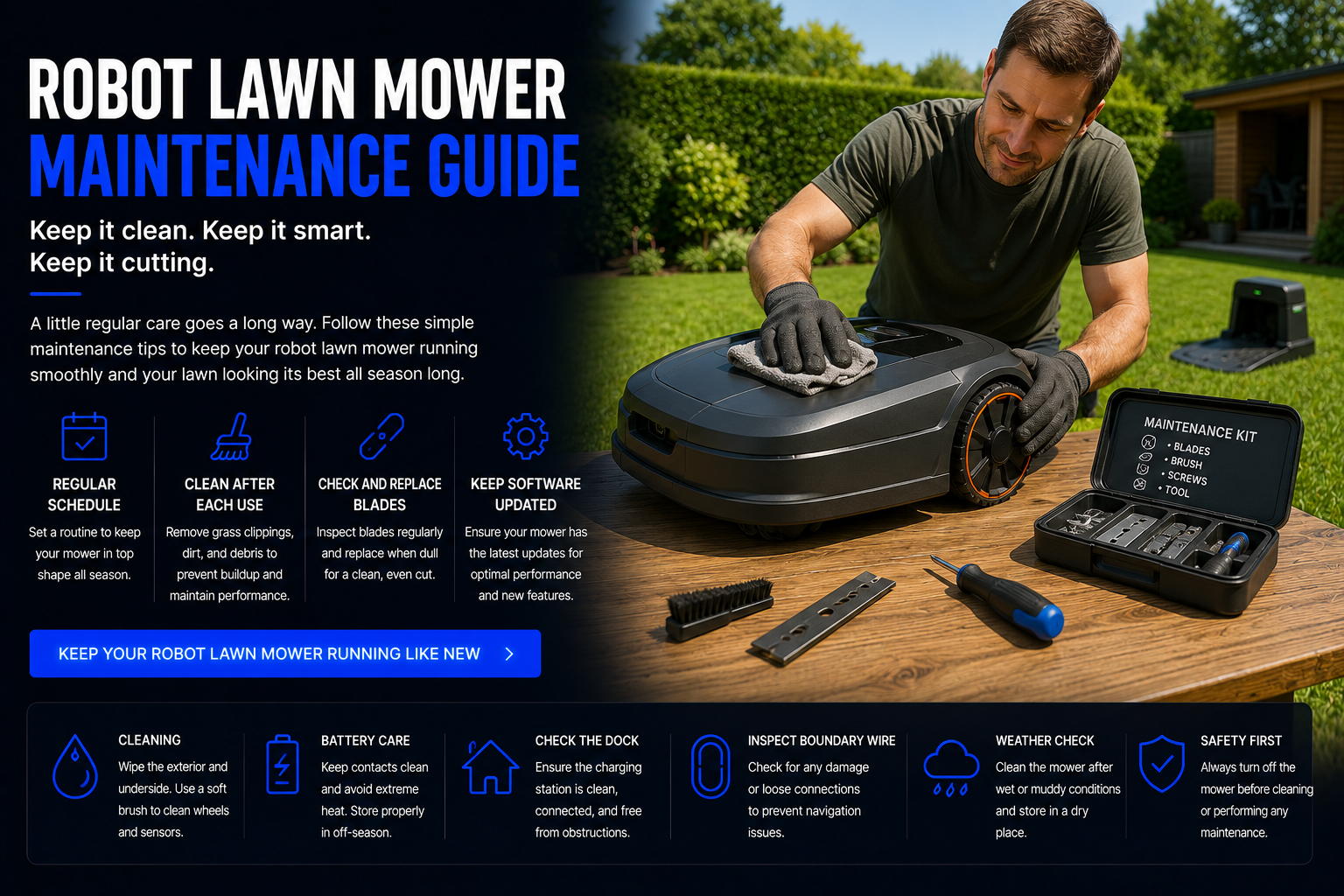
How Do You Maintain a Robot Lawn Mower?
To maintain a robot lawn mower, keep the blades sharp, clean grass buildup from the underside, inspect the wheels, wipe sensors, check the charging contacts, maintain the charging station, monitor the battery, inspect boundary wires if your mower uses them, update the software, and store the mower properly during the off-season.
Robot lawn mowers are outdoor home robots, so they deal with grass clippings, moisture, dirt, dust, mud, uneven terrain, heat, rain, insects, and seasonal weather changes. Without proper maintenance, a robotic mower can cut poorly, miss mowing zones, lose traction, fail to dock, drain battery faster, trigger errors, or stop working as expected.
The best maintenance routine depends on your mower type, yard size, grass growth, slope, soil conditions, mowing schedule, and whether you own a boundary wire robot mower, wire-free robot mower, GPS robot mower, RTK robot mower, or basic budget robot lawn mower.
Quick answer: replace or sharpen blades regularly, clean grass buildup often, keep sensors and charging contacts clean, inspect wheels and boundary wires, update the app, and store the mower correctly during winter or long breaks.
Robot Lawn Mower Maintenance Guide
Replace or Sharpen the Blades
Blade care is one of the most important parts of robot lawn mower maintenance. Dull blades tear grass instead of cutting it cleanly, which can make the lawn look ragged and may affect grass health. Robot lawn mowers often use small replaceable blades that wear down over time.
Check the blades regularly for dull edges, chips, rust, bending, or damage. Replace blades according to your mower’s usage and manufacturer recommendations. If your robot mower cuts frequently, has a large mowing area, or handles thick grass, blades may need replacement more often.
Clean Grass Buildup from the Underside
Grass clippings, moisture, dirt, and mud can build up underneath the mower. Too much buildup can reduce cutting performance, strain the motor, affect blade movement, and make the mower less efficient.
Turn off the mower completely before cleaning. Follow the manufacturer’s safety instructions, remove loose clippings, and wipe the underside carefully. Avoid using harsh water pressure unless your mower manual specifically allows it.
Clean the Wheels and Check Traction
Robot lawn mower wheels can collect mud, grass, sticks, and debris. Dirty wheels can reduce traction, especially on slopes, damp grass, uneven terrain, or yards with loose soil.
Inspect the wheels regularly. Remove debris from the tread, check for wear, and make sure the wheels spin correctly. If your robot mower struggles on hills or slips often, wheel condition should be one of the first things you inspect.
Wipe Sensors, Cameras, and Navigation Areas
Robot lawn mowers rely on sensors to detect obstacles, lift events, tilt, boundaries, docking, and navigation. More advanced models may use cameras, GPS, RTK antennas, ultrasonic sensors, or vision systems.
Dust, grass, pollen, mud, or water spots can interfere with these systems. Wipe sensor areas gently with a soft dry or slightly damp cloth. Keeping sensors clean helps improve obstacle detection, docking, safety performance, and mowing consistency.
Clean Charging Contacts
Dirty charging contacts can stop a robot lawn mower from charging correctly. If your mower fails to dock, charges slowly, or reports charging errors, dirty contacts may be the cause.
Clean the metal contacts on both the mower and charging station. Make sure the charging station is level, stable, and free of grass buildup. A clean charging system helps the mower return, recharge, and continue mowing reliably.
Inspect the Charging Station
The charging station is the home base for your robot lawn mower. It should be placed on a stable surface with clear access so the mower can dock smoothly.
Keep the area around the dock trimmed and free of sticks, leaves, toys, hoses, stones, and debris. Check cables, connectors, guide wires, and power supply parts as needed. If the mower has trouble returning home, the dock area should be inspected first.
Check Boundary Wire or Wire-Free Setup
If your robot mower uses boundary wire, inspect the wire path, connectors, pegs, breaks, and signal issues. A damaged boundary wire can cause the mower to stop, leave the mowing zone, or show boundary errors.
If your mower is wire-free, check mapping zones, GPS or RTK signal quality, app boundaries, antenna placement, and any virtual mowing zones. Wire-free robot lawn mowers still need setup maintenance, even without buried wire.
Update Software and App Settings
Smart robot lawn mowers often receive software updates that improve navigation, safety, scheduling, mower performance, app controls, obstacle avoidance, and connectivity.
Check the app regularly for updates. Review mowing schedules, rain settings, zone settings, security features, notifications, and firmware updates. Good software maintenance can improve the mower without replacing hardware.
Maintain the Battery
Battery health affects mowing time, docking behavior, and long-term performance. Robot lawn mowers usually use rechargeable batteries that slowly lose capacity over time.
Avoid unnecessary extreme heat exposure when possible, follow recommended charging practices, and store the mower correctly during long breaks. If runtime becomes much shorter, the battery may eventually need replacement.
Prepare for Seasonal Storage
If you do not mow during winter or dry seasons, proper storage matters. Clean the mower, replace worn blades, charge the battery according to the manufacturer’s instructions, disconnect or protect the dock if needed, and store the mower in a dry protected area.
Seasonal storage helps protect the battery, electronics, sensors, wheels, and blade system so the mower is ready when grass starts growing again.
Robot Lawn Mower Maintenance Schedule
| Maintenance Task | How Often | Why It Matters | Best For |
|---|---|---|---|
| Check blades | Weekly or as needed | Maintains clean cutting performance | All robot lawn mowers |
| Replace blades | As worn | Prevents tearing grass and poor cut quality | Frequent mowing schedules |
| Clean underside | Weekly during mowing season | Removes grass buildup and dirt | Wet or fast-growing lawns |
| Clean wheels | Weekly or after muddy mowing | Improves traction and slope handling | Sloped or uneven yards |
| Wipe sensors | Weekly | Improves obstacle detection and navigation | Smart and AI robot mowers |
| Clean charging contacts | Every few weeks | Prevents charging and docking issues | All robotic mowers |
| Inspect boundary wire | Monthly or after yard work | Prevents boundary signal problems | Boundary wire robot mowers |
| Check app updates | Monthly | Improves software and smart features | Smart robot lawn mowers |
| Seasonal storage | End of mowing season | Protects battery and electronics | Cold or off-season climates |
Most Important Robot Lawn Mower Parts to Maintain
Blades
Sharp blades create cleaner cuts and better lawn appearance. Dull blades can tear grass and reduce cutting quality.
Wheels
Wheels affect traction, slope performance, docking, and movement across uneven grass or damp soil.
Sensors
Sensors help the mower detect obstacles, boundaries, lift events, tilt, docking areas, and navigation signals.
Battery
Battery condition affects runtime, mowing coverage, charging behavior, and long-term mower performance.
Charging Station
The charging station powers the mower and often connects with boundary or guide wire systems.
Boundary System
Boundary wires, guide wires, virtual maps, GPS zones, and RTK systems define where the robot mower should cut.
Robot Lawn Mower Blade Maintenance
Robot lawn mower blades are smaller than traditional mower blades, but they are still essential. Because robot mowers trim grass frequently, sharp blades help maintain a cleaner lawn and reduce ragged grass tips.
Blade wear depends on grass thickness, mowing frequency, yard size, soil, sticks, leaves, small debris, and whether the mower hits hard objects. If the lawn starts looking uneven or grass tips appear torn, inspect the blades.
Always turn the mower off completely before touching the blade area. Use replacement blades designed for your specific mower model. Do not use damaged, bent, rusty, or incorrect blades.
Battery Care for Robot Lawn Mowers
Battery care is important because the battery powers every mowing cycle, return-to-dock behavior, and long-term reliability. A weak battery may cause shorter mowing sessions, incomplete cuts, docking problems, or more frequent charging.
Follow the manufacturer’s charging and storage instructions. During long storage periods, do not ignore battery recommendations. Some mowers should be stored with a partial charge, while others may require specific seasonal charging steps.
If your robot lawn mower used to cover the yard easily but now runs out of power quickly, battery age, dirty wheels, grass buildup, dull blades, or mowing schedule problems may be involved.
Boundary Wire Maintenance
Boundary wire robot lawn mowers rely on a wire signal to know where to mow. If the wire breaks, shifts, disconnects, or gets damaged during landscaping, the mower may stop working or show a boundary error.
Common causes of boundary wire problems include edging tools, aeration, digging, pets, roots, weather, loose connectors, and accidental cuts. If your mower suddenly cannot find the boundary, check connectors, wire path, docking station connections, and any recent yard work areas.
Keep a small repair kit available if your mower uses boundary wire. Wire connectors, extra pegs, and replacement boundary wire can save time when problems happen.
Wire-Free Robot Lawn Mower Maintenance
Wire-free robot lawn mowers avoid physical boundary wire, but they still need maintenance. GPS robot mowers, RTK robot mowers, camera-based mowers, and AI navigation mowers may require clean sensors, clear signal areas, updated maps, proper antenna placement, and accurate app boundaries.
If a wire-free robot mower behaves strangely, check signal quality, map accuracy, software updates, virtual boundary settings, camera cleanliness, and whether trees, buildings, walls, or weather conditions are affecting navigation.
Wire-free systems can be easier to install, but they are not maintenance-free. Digital boundaries need occasional review, especially after landscaping changes.
Robot Lawn Mower Maintenance for Different Yard Types
Small Yards
Small yards usually create less wear, but the mower may still need blade checks, sensor cleaning, dock cleaning, and seasonal storage.
Large Yards
Large yards require more frequent blade replacement, battery monitoring, wheel cleaning, and mowing schedule adjustments because the robot covers more area.
Sloped Yards
Sloped yards put more demand on wheels, motors, traction, and battery power. Clean wheels often and inspect for slipping or uneven wear.
Wet or Damp Lawns
Wet lawns can cause grass buildup under the mower. Clean the underside more often and consider using rain settings to avoid poor mowing conditions.
Lawns with Trees
Sticks, seeds, leaves, and roots can affect robot mowing. Keep the lawn clear and inspect blades more often if debris is common.
Homes with Pets or Kids
Check the mowing area for toys, pet waste, hoses, balls, and small objects before scheduled mowing. A clear lawn protects the mower and improves safety.
Common Robot Lawn Mower Problems and Fixes
| Problem | Common Cause | What to Try |
|---|---|---|
| Poor cut quality | Dull blades or grass buildup | Replace blades and clean underside |
| Mower will not charge | Dirty contacts or dock issue | Clean contacts and inspect charging station |
| Mower gets stuck | Uneven terrain, holes, roots, or obstacles | Clear obstacles and improve problem areas |
| Boundary error | Broken wire or loose connector | Inspect boundary wire and dock connections |
| Short runtime | Battery aging, dull blades, heavy grass | Check battery, blades, grass height, and schedule |
| Slipping on slopes | Dirty wheels or poor traction | Clean wheels and check slope rating |
| Navigation issues | Dirty sensors or outdated map | Clean sensors and update app settings |
| Noisy operation | Loose parts, debris, worn blades | Inspect blade area, wheels, and underside |
Seasonal Robot Lawn Mower Maintenance
Seasonal maintenance is important because robot lawn mowers are outdoor machines. At the end of the mowing season, clean the mower thoroughly, inspect blades, remove grass buildup, check wheels, wipe sensors, and follow the battery storage instructions.
If your area has winter weather, store the mower indoors in a dry location. Some charging stations may stay outside depending on the model, while others should be disconnected or protected. Always follow the manufacturer’s recommendations.
Before the next mowing season starts, inspect the mower, replace worn blades, clean the dock, check boundary wires or virtual maps, update the software, and run a short test cycle before relying on the mower full time.
Robot Lawn Mower Maintenance vs Traditional Mower Maintenance
Robot lawn mower maintenance is usually different from traditional mower maintenance. Traditional gas mowers may require oil changes, spark plugs, air filters, fuel care, belts, blade sharpening, and engine maintenance. Robot lawn mowers usually focus more on blades, sensors, batteries, charging contacts, software, boundary systems, and dock care.
Robot mowers often require less physical labor, but they still need consistent small maintenance tasks. Traditional mowers may require fewer smart-system checks but more engine or manual equipment care.
For many homeowners, robotic mower maintenance is easier than traditional mowing maintenance, especially if the yard is simple and the mower is cleaned regularly.
How to Make a Robot Lawn Mower Last Longer
- Keep blades sharp: Dull blades force the mower to work harder and reduce cut quality.
- Clean grass buildup: A clean underside helps the mower cut more efficiently.
- Protect the battery: Follow charging and seasonal storage instructions.
- Keep the dock clear: A clear docking area prevents charging and return errors.
- Remove lawn debris: Pick up toys, sticks, hoses, rocks, and pet waste before mowing.
- Use the right schedule: Frequent light mowing is better than forcing the mower through tall grass.
- Update software: Firmware updates can improve mowing behavior and reliability.
- Inspect after storms: Check for branches, wire damage, mud, or dock movement after bad weather.
Future of Robot Lawn Mower Maintenance
Robot lawn mower maintenance is becoming easier as smart gardening robots improve. Future models may include better self-diagnostics, blade wear detection, automatic cleaning reminders, smarter battery management, advanced obstacle recognition, improved virtual boundaries, and app-based maintenance alerts.
As outdoor robotics develops, robot lawn mowers may connect more closely with smart irrigation systems, lawn sensors, AI home robots, smart garage robots, home maintenance robots, and outdoor security robots. Future lawn systems may adjust mowing based on grass growth, rain, soil moisture, temperature, foot traffic, and seasonal patterns.
For homeowners, the trend is clear: robot mowers should become easier to maintain, smarter to schedule, safer to operate, and more connected to the rest of the smart home.
Related Robot Lawn Mower Guides
Related Home Robot Guides
Robot Lawn Mower Maintenance FAQ
How often should I maintain a robot lawn mower?
You should check blades, clean the underside, wipe sensors, inspect wheels, and check the charging station regularly during mowing season.
How often should robot lawn mower blades be replaced?
Blade replacement depends on mowing frequency, yard size, grass thickness, and debris. Replace blades when they become dull, bent, rusty, chipped, or damaged.
Why is my robot lawn mower cutting poorly?
Poor cutting is often caused by dull blades, grass buildup, tall grass, wet grass, low battery performance, or incorrect mowing schedules.
Can I wash a robot lawn mower with water?
Some models allow light cleaning, while others should not be sprayed. Always follow the manufacturer’s cleaning instructions and avoid high-pressure washing unless allowed.
Why will my robot lawn mower not charge?
Charging problems may be caused by dirty charging contacts, a blocked dock, loose cables, power supply problems, or battery issues.
How do I clean robot lawn mower sensors?
Use a soft cloth to gently wipe sensor areas, cameras, bumpers, and navigation surfaces. Do not spray cleaner directly into electronic areas.
Do robot lawn mowers need oil changes?
Most electric robot lawn mowers do not need oil changes like gas mowers. Maintenance is usually focused on blades, battery, sensors, wheels, and charging systems.
How do I store a robot lawn mower for winter?
Clean the mower, follow battery storage instructions, inspect blades, protect or disconnect the dock if needed, and store the mower in a dry protected place.
Why does my robot lawn mower get stuck?
Common causes include holes, roots, wet grass, steep slopes, dirty wheels, obstacles, uneven ground, or mowing areas that need adjustment.
How do I fix a boundary wire error?
Check wire connectors, inspect recent digging or edging areas, look for breaks, and confirm the charging station is connected properly.
Do wire-free robot lawn mowers need maintenance?
Yes. Wire-free robot mowers still need blade care, sensor cleaning, battery care, software updates, map checks, and charging station maintenance.
How long does a robot lawn mower battery last?
Battery lifespan depends on model, usage, charging habits, temperature, and storage. Runtime usually decreases gradually as the battery ages.
Should I mow wet grass with a robot lawn mower?
Some robot mowers can handle damp grass, but wet mowing may reduce cut quality and increase grass buildup. Rain settings can help avoid poor conditions.
Can poor maintenance damage a robot lawn mower?
Yes. Ignoring blades, grass buildup, sensors, wheels, charging contacts, and battery care can reduce performance and shorten the mower’s life.
What replacement parts do robot lawn mowers need?
Common replacement parts include blades, screws, batteries, wheels, charging contacts, boundary wire, connectors, and sometimes dock accessories.
Shop Robot Lawn Mower Parts and Accessories
Proper maintenance helps your robot lawn mower cut cleaner, dock better, last longer, and perform more reliably. Compare robotic mower blades, replacement parts, smart mower accessories, boundary wire kits, and robot lawn mower systems for your yard.
Shop Robot Lawn Mower Parts