
Robot Vacuum Maintenance Guide
Learn how to maintain a robot vacuum with simple cleaning schedules, filter care, brush maintenance, and troubleshooting tips for longer lifespan. This guide explains the major options, practical tradeoffs, maintenance needs, and buying considerations.
As an Amazon Associate, HomeBotGuide may earn from qualifying purchases at no extra cost to you.
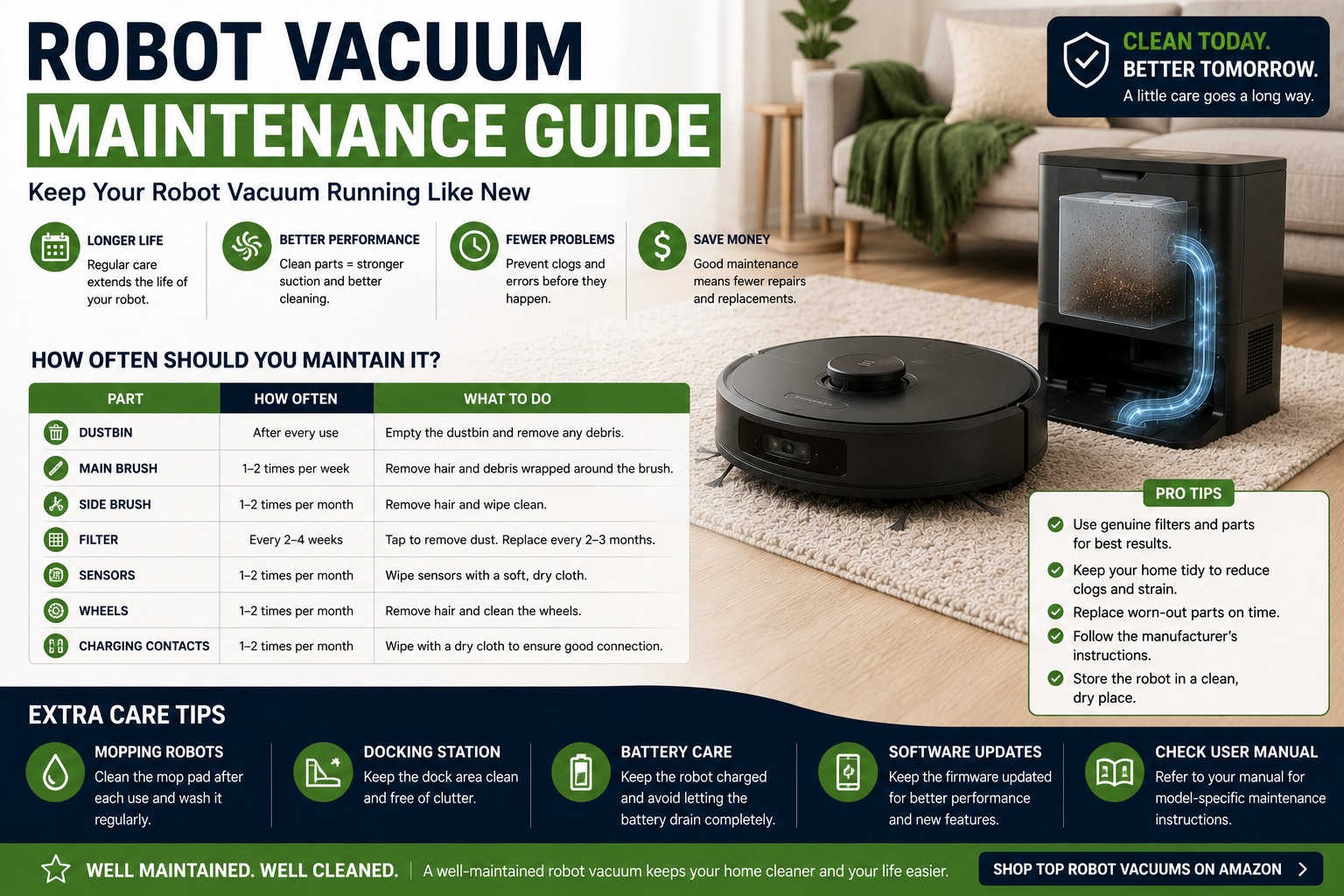
To keep a robot vacuum working well, empty the bin, remove hair from rollers and wheels, clean sensors and charging contacts, replace filters on schedule, and inspect the dock airflow path. Small weekly maintenance prevents most suction loss, navigation errors, and premature battery strain.
Robot Vacuum Maintenance Guide at a Glance
Prevents airflow loss and hair buildup.
Maintains navigation and traction.
Restores airflow and catches hidden clogs.
Brushes, filters, batteries, and pads lose performance.
Robot Vacuum Maintenance Guide Comparison Table
| Type | Best For | Core Features | Important Limitation |
|---|---|---|---|
| Dustbin | Every few runs | Empty and wipe clean | Overfilling reduces suction |
| Main Roller | Weekly | Remove hair and debris | Wrapped hair strains motor |
| Side Brush | Weekly | Untangle and inspect shape | Bent arms miss edges |
| Filter | Weekly to monthly | Tap clean or replace | Washing may damage some filters |
| Sensors | Weekly | Wipe with soft dry cloth | Dirty sensors affect navigation |
| Dock Air Path | Monthly | Inspect inlet, bag, seals, filters | Clogs prevent emptying |
What to Consider First
Begin with the actual home layout, floor types, cleaning frequency, debris load, and maintenance tolerance. The strongest choice is the system that can complete the real routine reliably.
- Match the cleaning method to the actual surfaces.
- Check navigation, battery, and dock requirements.
- Review ongoing maintenance and consumable cost.
- Confirm replacement parts and support.
Main Options to Consider
Empty and wipe clean
Remove hair and debris
Untangle and inspect shape
Tap clean or replace
Daily and Weekly Routine
Frequent light maintenance is easier than waiting for performance to drop.
- Follow the manufacturer guidance for the specific model.
- Check compatibility with the real floor plan and surfaces.
- Review maintenance and replacement-part requirements.
- Keep a manual cleaning backup available.
Main Brush Care
Remove the roller, clear hair from both ends, clean the axle, and inspect bearings.
- Follow the manufacturer guidance for the specific model.
- Check compatibility with the real floor plan and surfaces.
- Review maintenance and replacement-part requirements.
- Keep a manual cleaning backup available.
Side Brushes and Wheels
Cut tangled hair carefully and replace bent side brushes or worn tires.
- Follow the manufacturer guidance for the specific model.
- Check compatibility with the real floor plan and surfaces.
- Review maintenance and replacement-part requirements.
- Keep a manual cleaning backup available.
Filter Maintenance
Follow the manufacturer's instructions because some filters are washable and others are not.
- Follow the manufacturer guidance for the specific model.
- Check compatibility with the real floor plan and surfaces.
- Review maintenance and replacement-part requirements.
- Keep a manual cleaning backup available.
Sensors and Charging Contacts
Use a soft dry cloth on cliff sensors, cameras, lidar windows, and charging plates.
- Follow the manufacturer guidance for the specific model.
- Check compatibility with the real floor plan and surfaces.
- Review maintenance and replacement-part requirements.
- Keep a manual cleaning backup available.
Self-Emptying Dock Care
Check the bag, inlet tube, seals, filters, and debris path for hidden blockages.
- Follow the manufacturer guidance for the specific model.
- Check compatibility with the real floor plan and surfaces.
- Review maintenance and replacement-part requirements.
- Keep a manual cleaning backup available.
Battery Health
Keep charging contacts clean, avoid extreme temperatures, and replace the battery when runtime declines substantially.
- Follow the manufacturer guidance for the specific model.
- Check compatibility with the real floor plan and surfaces.
- Review maintenance and replacement-part requirements.
- Keep a manual cleaning backup available.
Troubleshooting Common Errors
Navigation errors often come from dirty sensors, stuck wheels, blocked rollers, or corrupted maps.
- Follow the manufacturer guidance for the specific model.
- Check compatibility with the real floor plan and surfaces.
- Review maintenance and replacement-part requirements.
- Keep a manual cleaning backup available.
Automation Still Requires Maintenance
Robot vacuums reduce repetitive floor cleaning but still require preparation, brush care, filter replacement, dock maintenance, and periodic manual deep cleaning.
How We Evaluated the Options
We prioritized real-world cleaning, navigation, battery, serviceability, bin and dock design, obstacle handling, replacement parts, warranty, software support, and total ownership value.
Final Verdict
To keep a robot vacuum working well, empty the bin, remove hair from rollers and wheels, clean sensors and charging contacts, replace filters on schedule, and inspect the dock airflow path. Small weekly maintenance prevents most suction loss, navigation errors, and premature battery strain.
Robot Vacuum Maintenance Guide FAQ
How often should I clean a robot vacuum?
Check the bin and brushes every few runs and perform a deeper weekly inspection.
Can I wash the filter?
Only if the manufacturer says it is washable.
How do I remove hair from the roller?
Remove the roller and cut hair away from the brush and end caps.
Why is suction weaker?
Common causes include a full bin, clogged filter, blocked intake, or wrapped brush.
Why does the robot get lost?
Dirty sensors, changed furniture, weak lighting, or a damaged map can cause navigation problems.
How often should side brushes be replaced?
Replace them when bent, cracked, or no longer reaching edges.
How do I clean charging contacts?
Wipe them gently with a dry cloth after unplugging the dock if required.
How long does a robot vacuum battery last?
Often several years, depending on use, heat, charging, and replacement availability.
Why will the dock not empty the bin?
Check the bag, inlet, bin door, seals, and airflow path for clogs.
What maintenance extends lifespan most?
Keeping rollers, wheels, filters, and sensors clean prevents unnecessary strain.